







Add Count Labels on Top of ggplot2 Barchart in R (Example)
In this tutorial you’ll learn how to add the frequency count on the top of each bar of a ggplot2 barchart in R.
Table of contents:
If you want to learn more about these topics, keep reading…
Example Data, Packages & Basic Plot
We’ll use the following data as basement for this R tutorial:
set.seed(983274)                                          # Create random example data
data <- data.frame(x = sample(LETTERS[1:5], 100, replace = TRUE))
head(data)                                                # Print first lines of data
# x
# 1 D
# 2 C
# 3 B
# 4 B
# 5 C
# 6 C
Have a look at the previously shown output of the RStudio console. It shows that our example data has only one column containing alphabetic letters.
For the following R syntax, we also have to install and load the ggplot2 package:
install.packages("ggplot2")                                 # Install & load ggplot2 package
library("ggplot2")
Finally, let’s move on to the example code…
Example: Drawing Barplot with Values on Top
In this Example, I’ll explain how to plot frequency labels on top of each bar of a ggplot2 barplot. First, we need to compute the frequency count within each group of our data:
data_srz <- as.data.frame(table(data$x))                  # Summarize data
data_srz                                                  # Print summarized data
#   Var1 Freq
# 1    A   21
# 2    B   15
# 3    C   23
# 4    D   18
# 5    E   23
In the output of the RStudio console above, you can see how often each group is contained in our example data. Now, we can plot our data in a barchart with counting labels on top as shown below:
ggplot(data_srz, aes(x = Var1, y = Freq, fill = Var1)) +  # Plot with values on top
  geom_bar(stat = "identity") +
  geom_text(aes(label = Freq), vjust = 0)
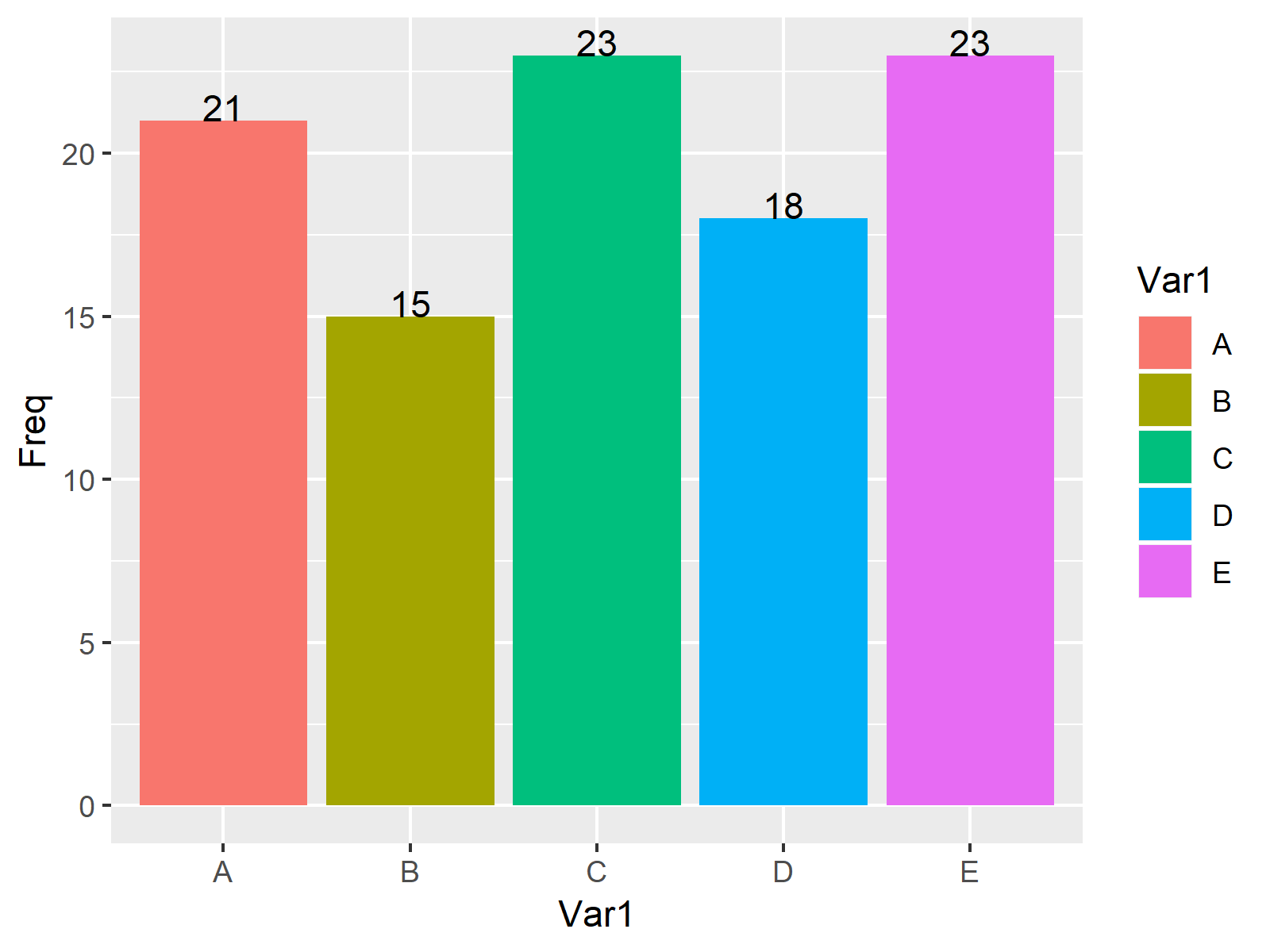
As visualized in Figure 1, the previously shown R programming syntax created a barplot with counts on top of each bar with the ggplot2 package.
Video, Further Resources & Summary
Do you want to learn more about drawing labels on top of bars? Then I can recommend watching the following video of my YouTube channel. In the video, I illustrate the R codes of this tutorial.
Furthermore, I can recommend having a look at some of the other tutorials of this website. I have published several tutorials already:
- Plot Frequencies on Top of Stacked Bar Chart with ggplot2
- Creating Barcharts with R
- How to Order Bars of ggplot2 Barchart
- Draw Scatterplot with Labels in R
- Scale Bars of Stacked Barplot to a Sum of 100 Percent
- R Graphics Gallery
- The R Programming Language
To summarize: At this point you should know how to print the count labels of each bar on the top of the barchart in the R programming language. Let me know in the comments section below, in case you have any additional questions.

I’m Joachim Schork. On this website, I provide statistics tutorials as well as code in Python and R programming.
Statistics Globe Newsletter
Get regular updates on the latest tutorials, offers & news at Statistics Globe. I hate spam & you may opt out anytime: Privacy Policy.


8 Comments. Leave new
How would you handle this if you had multiple entries for A, B, C etc? I am getting stacked numbers on the bars because there are multiple rows with data (the rows denote users, the X is a factor, and the Y is a total per user).
Hi Rick,
I’m sorry for the late response, I just came back from holidays. Do you still need help with this?
Regards,
Joachim
Hi
I interested in adding label at the end of the multiples line by their respective groups.
x=2000:2024
y= 1:25
religion= c(“Christians”, “Muslims”, “Hindus”, “Jews”, “Others”)
However, I used this command
geom_label_repel(data=death%>%filter(religion==”Christians”), aes(x=x, y=y, label=religion), color=religion), size=2.5)+
Unfortunately. the plot is showing labels for all the points. But I am interested in only one label at the end of the line. Can you please help?
Hey,
Thanks for the kind comment. Please have a look at this tutorial.
Regards,
Joachim
Hiya!!
I am following this step first.
data <- data.frame(x = 1:10, y = c(3, 1, NA, 5, 5, NA, NA, 4, 3, 6))
data_comp %filter(religion==”Christians”), aes(x=x, y=y, label=religion), color=religion), size=2.5)+
It is not working in tis case.
Please help
Hey,
Your code seems to be wrongly formatted. Where is
data_compcoming from? What’s the content of these data?Regards,
Joachim
data <- data.frame(x = 1:10, y = c(3, 1, NA, 5, 5, NA, NA, 4, 3, 6), religion=c("Christians", "Hindus", "Muslims", ""Christians", "Christians", "Christians", "Jews:, "Hindus", "Jews", "Hindus")
data_comp <- data[!is.na(data$y), ]
ggplot() +
geom_line(data = data_comp, aes(x, y), linetype = "dashed") +
geom_line(data = data, aes(x, y))
data_label<-data
data_label$religion<-NA
data_label$label[which(data_label$s==max(data_label$s))]% %filter(religion==”Christians”), aes(x=x, y=y, label=religion), color=religion), size=2.5)+
Is this correct?
Hey,
Please try this code:
Regards,
Joachim