







ggplot2 Error in R: “`data` must be a data frame, or other object coercible by `fortify()`, not an integer vector”
This article explains how to deal with the ggplot2 error message “`data` must be a data frame, or other object coercible by `fortify()`, not an integer vector” in R.
The content looks as follows:
Let’s take a look at some R codes in action.
Exemplifying Data, Packages & Default Graph
We’ll use the following data as basement for this tutorial:
data <- data.frame(x = 7:2,        # Create example data
                   y = 4:9)
data                               # Print example data
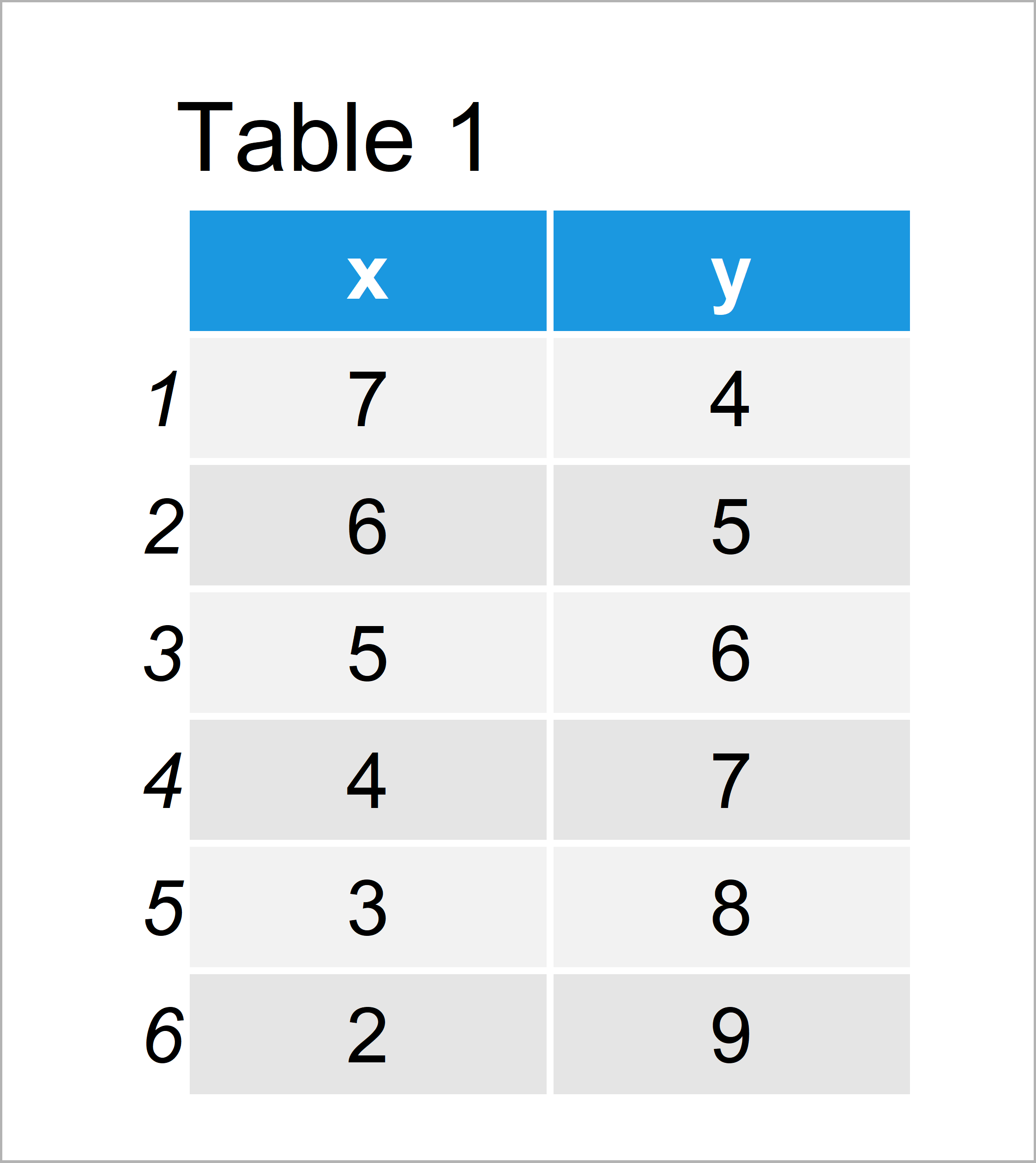
Table 1 reveals that our example data consists of six data points and two numeric columns.
In this tutorial, we also need to install and load the ggplot2 package.
install.packages("ggplot2")        # Install ggplot2 package
library("ggplot2")                 # Load ggplot2 package
Example 1: Reproduce the Error Message – `data` must be a data frame, or other object coercible
This example illustrates how to replicate the error “`data` must be a data frame, or other object coercible by `fortify()`, not an integer vector” in R.
Let’s assume that we want to draw a ggplot2 scatterplot showing the variables x and y of our data:
ggplot(data$x, aes(x, y)) +        # False specification in ggplot
  geom_point()
# Error: `data` must be a data frame, or other object coercible by `fortify()`, not an integer vector
# Run `rlang::last_error()` to see where the error occurred.
The previous R code leads to the error message “`data` must be a data frame, or other object coercible by `fortify()`, not an integer vector”.
The reason for that is that we have tried to specify a numeric vector as data argument.
Have a closer look at the first line of our code. We have used the R code “ggplot(data$x”, i.e. we used the column x as data.
The ggplot2 function, however, needs a data frame as input.
So how can we solve this problem?
Example 2: Fix the Error Message – `data` must be a data frame, or other object coercible
In Example 2, I’ll explain how to handle the error message “`data` must be a data frame, or other object coercible by `fortify()`, not an integer vector”.
To solve our problem, we have to specify a data frame instead of a vector at the beginning of the ggplot function:
ggplot(data, aes(x, y)) +          # Properly draw ggplot2 pot
  geom_point()
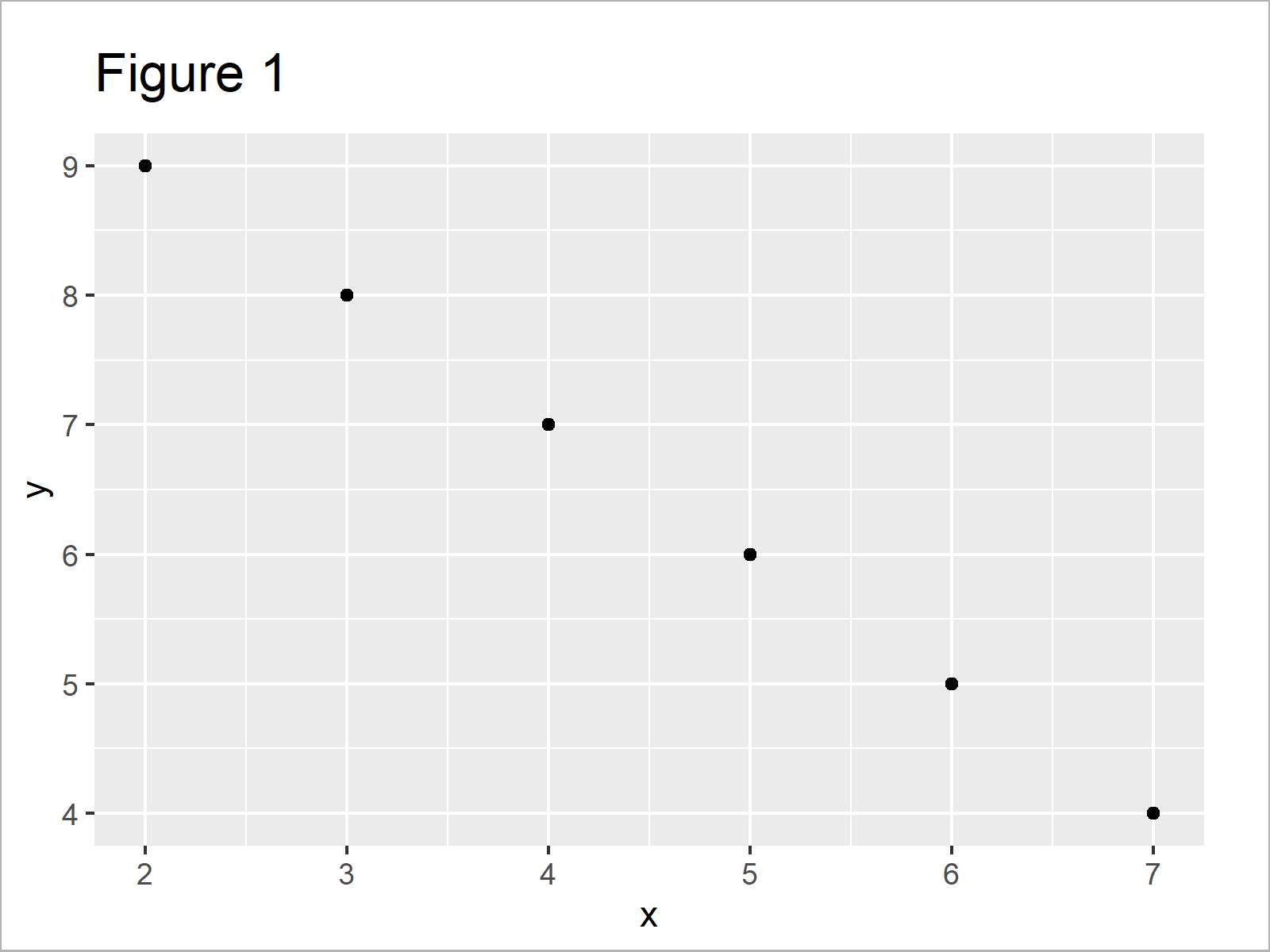
As shown in Figure 1, we have created a scatterplot of our data frame using the previous syntax.
Video, Further Resources & Summary
Do you need more explanations on the content of this tutorial? Then you might want to watch the following video tutorial of the Statistics Globe YouTube channel. I show the R programming codes of this tutorial in the video:
Furthermore, you could read the other articles of https://www.statisticsglobe.com/.
- ggplot2 Package in R – Tutorial & Examples
- Error in as.Date.numeric(X) : ‘origin’ must be supplied
- Error in hist.default : ‘x’ must be numeric
- ggplot2 Error: stat_count() must not be used with a y aesthetic
- ggplot2 Error: Aesthetics must be either length 1 or the same as the data
- ggplot2 Error in R: Must be Data Frame not S3 Object with Class Uneval
- Solving Warnings & Errors in R (Cheat Sheet)
- Plots in R
- All R Programming Tutorials
To summarize: You have learned in this article how to handle the error “`data` must be a data frame, or other object coercible by `fortify()`, not an integer vector” in the R programming language. In case you have further questions and/or comments, tell me about it in the comments section. Furthermore, please subscribe to my email newsletter in order to get regular updates on new tutorials.

I’m Joachim Schork. On this website, I provide statistics tutorials as well as code in Python and R programming.
Statistics Globe Newsletter
Get regular updates on the latest tutorials, offers & news at Statistics Globe. I hate spam & you may opt out anytime: Privacy Policy.