







Join Multiple data.tables in R (6 Examples)
This article explains how to merge multiple data.tables in various ways in R programming. We show the different possible ways of merging data.tables with two and three data.tables.
Table of contents:
So now the part you have been waiting for – the examples.
Example Data & Packages
We first have to install and load the data.table package:
install.packages("data.table")                    # Install & load data.table package
library("data.table")
We also have to create some data that we can use in the example syntax later on:
DT1 <- data.table(V1 = 1:4,                       # Create data.table
                  V2 = c("a", "a", "b", "b"),
                  V3 = c("c", "d", "c", "d"))
DT1                                               # Print data.table
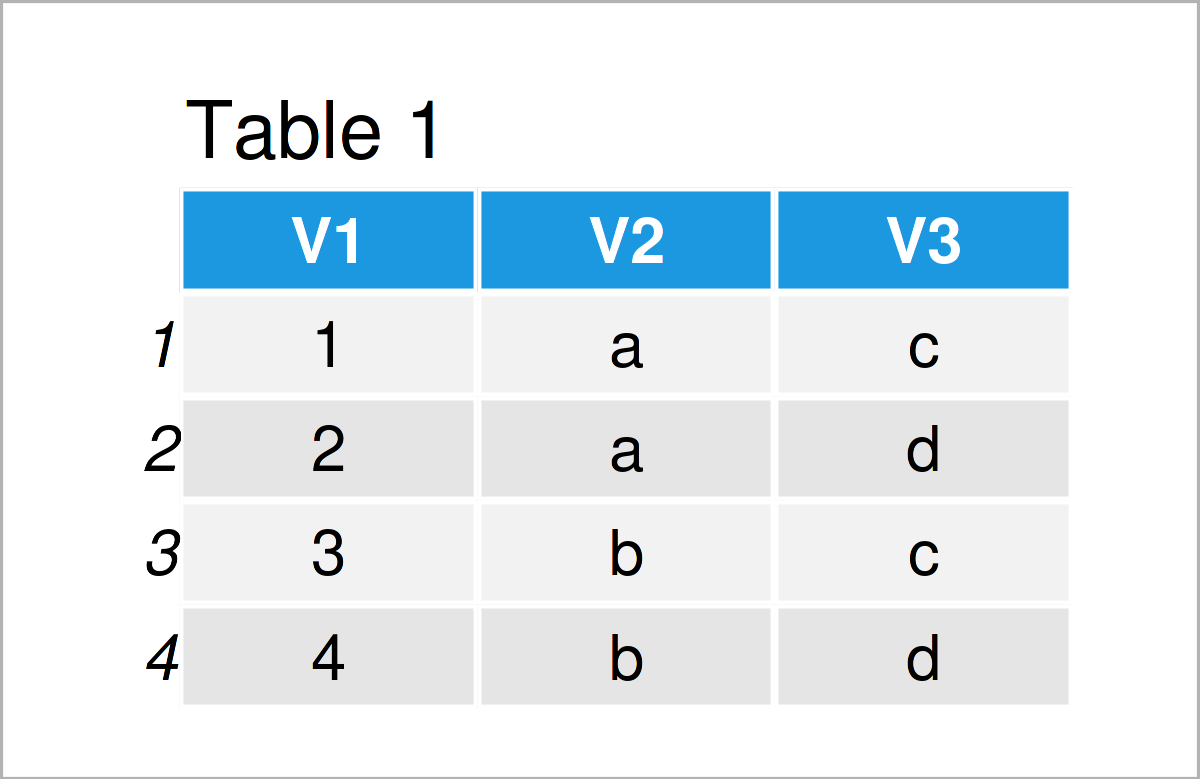
Table 1 shows the structure of the exemplifying data: It is made of four rows and three columns.
DT2 <- data.table(V1 = 2:5,                       # Create data.table
                  V4 = 5:6,
                  V5 = c(FALSE, TRUE, TRUE, TRUE))
DT2                                               # Print data.table
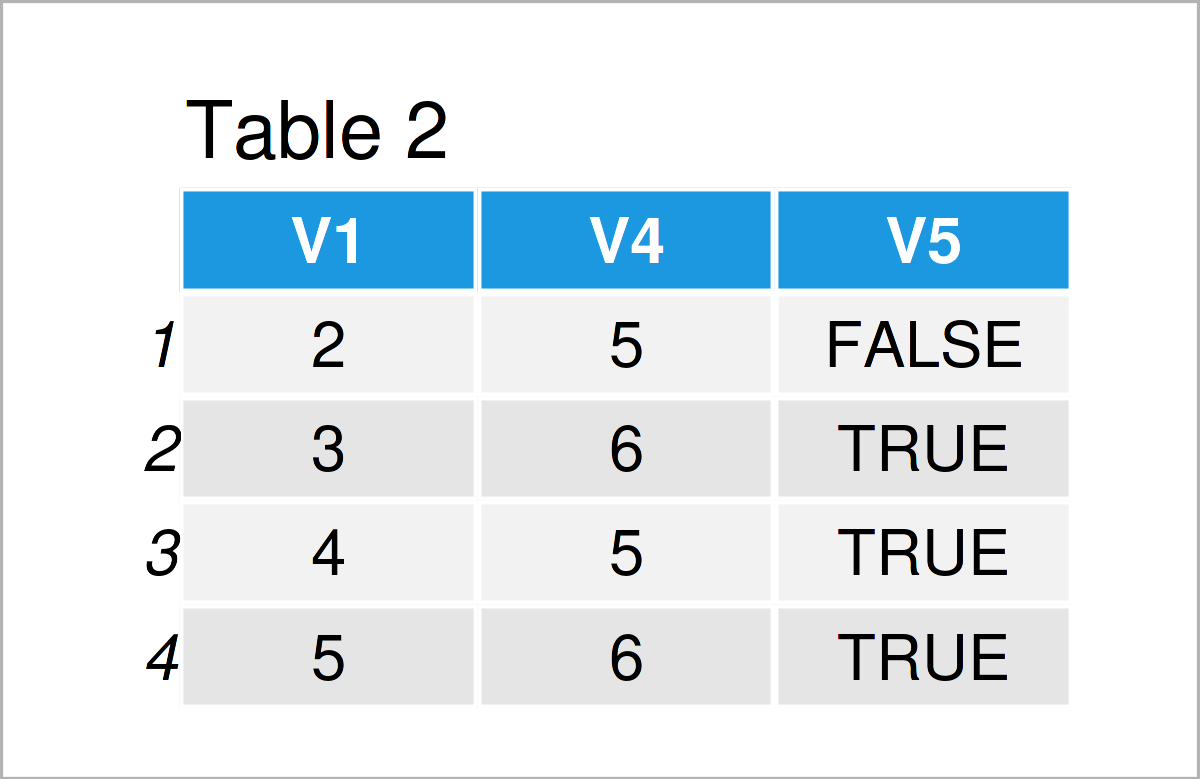
In Table 2 it is shown that we have created a data.table with the previous R programming syntax. Take a look at variable V1, we can see this variable as an identifier. Comparing DT1 to DT2 we see that DT1 and DT2 share information on observations with V1=2,3,4.
Finally, we generate a third data.table called DT3.
DT3 <- data.table(V1 = 4:6, # Create data.table
                  V2 = c("b", "b", "a"),
                  V6 = c(10, 11, 12))
DT3 # Print data.table
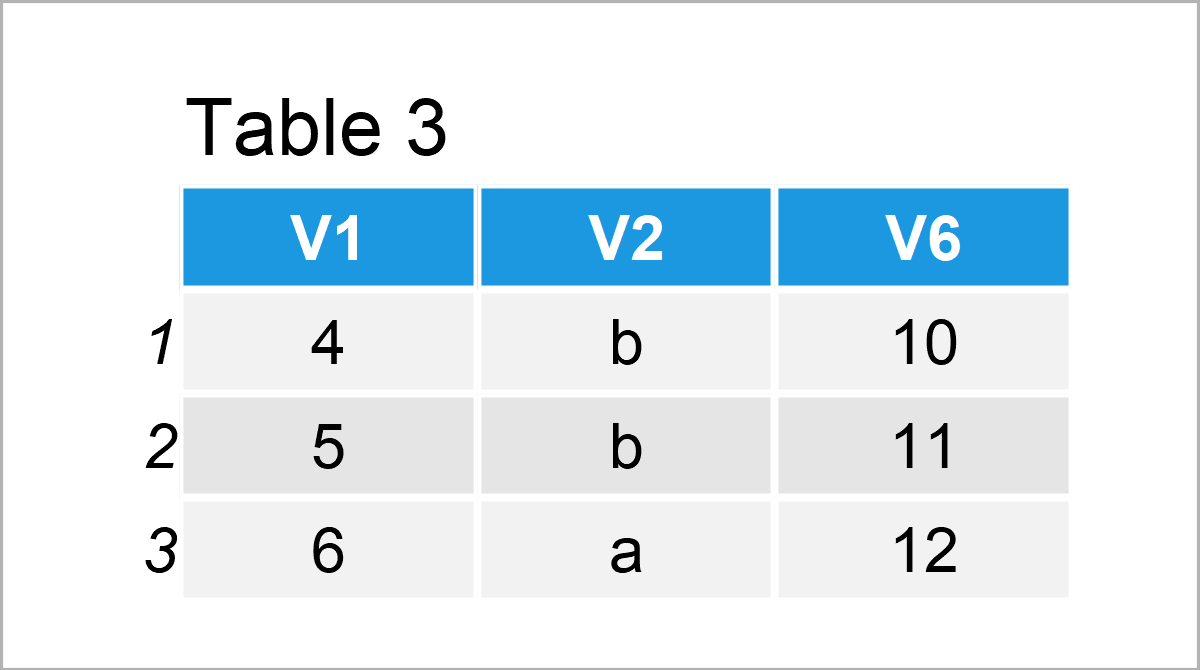
As you can see from Table 3, we again have a column V1 to identify observations in the three data.tables DT1, DT2, and DT3.
To get further information on data.table: Take a look at our data.table page here for more data.table tutorials. If you want to have a more visual intuition of the different ways of combining data.tables in R, have a look at this R Studio post. Furthermore, you can find the CRAN page of the package here and the documentation here.
Example 1: Inner Join of Two data.tables
In Example 1, I’ll demonstrate how to make an inner join of two data.tables with merge().
DT1_2_inner <- merge(DT1, DT2, all = FALSE)       # Inner join
DT1_2_inner                                       # Print data.table
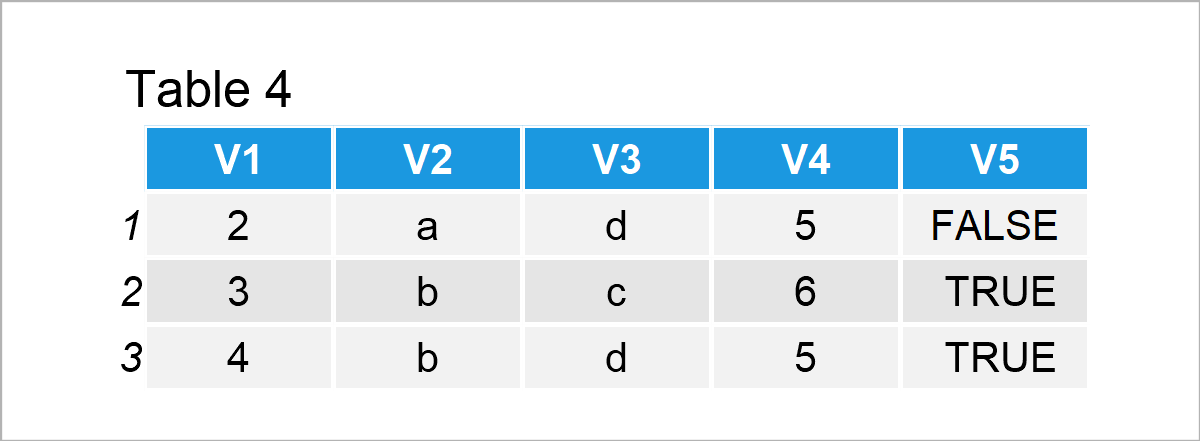
Table 4 shows the output of the previous syntax – the inner join. Function merge() automatically takes the common variable V1 as the identifier variable of the two data.tables. As we set argument all = FALSE, we indicate that we only want to merge those data rows with the common values of identifier V1.
Example 2: Left Outer Join of Two data.tables
In this section, I’ll illustrate how to make a left outer join.
DT1_2_out_left <- merge(DT1, DT2, all.x = TRUE)   # Outer join: Left
DT1_2_out_left                                    # Print data.table
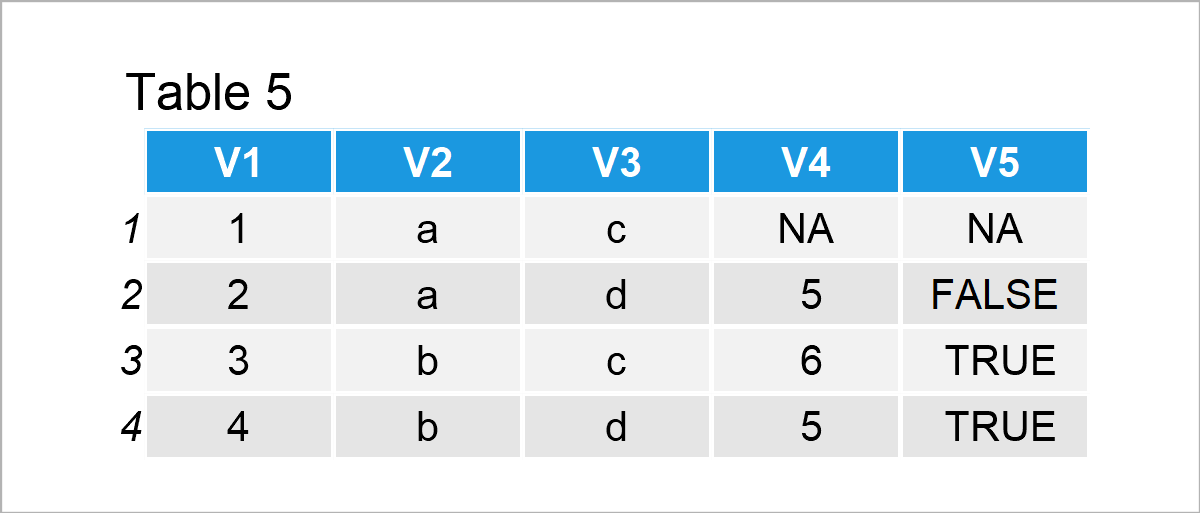
After executing the previously shown syntax the data.table shown in Table 5 has been created. We made a left outer join. That is, we take DT1 and then add all additional information of these data rows (identified with common variable V1) available from DT2.
Example 3: Right Outer Join of Two data.tables
The following R programming syntax explains how to do a right join.
DT1_2_out_right <- merge(DT1, DT2, all.y = TRUE)  # Outer join: Right
DT1_2_out_right                                   # Print data.table
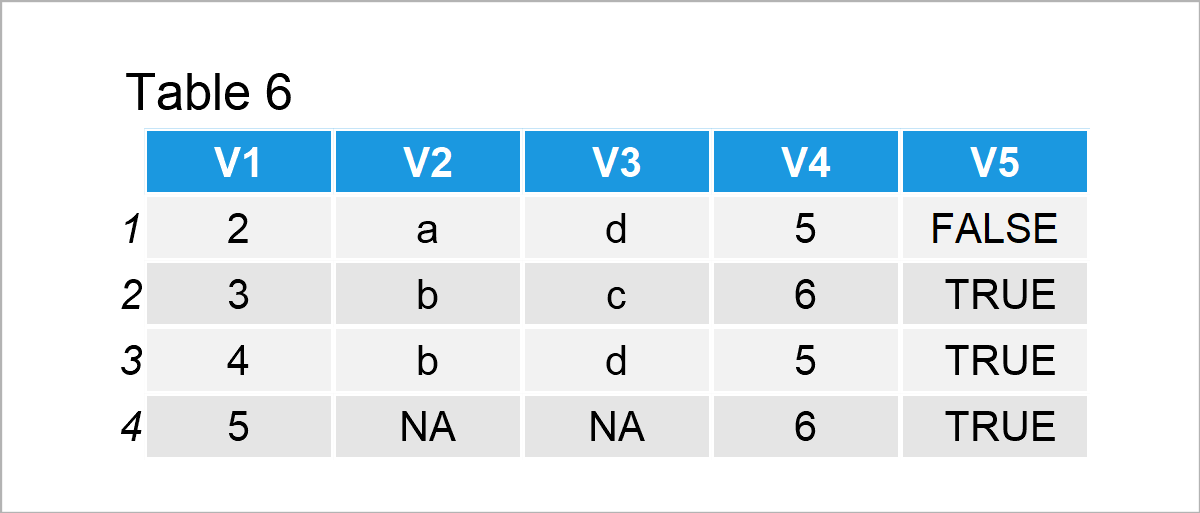
The output of the previous R code is shown in Table 6. This time we took the information of DT2 and merged to it the information of DT1. All unavailable information is set to NA.
Example 4: Full Join of Two data.tables
In this example, I’ll explain how to do a full join of two data.tables.
DT1_2_full <- merge(DT1, DT2, all = TRUE)         # Full join
DT1_2_full                                        # Print data.table
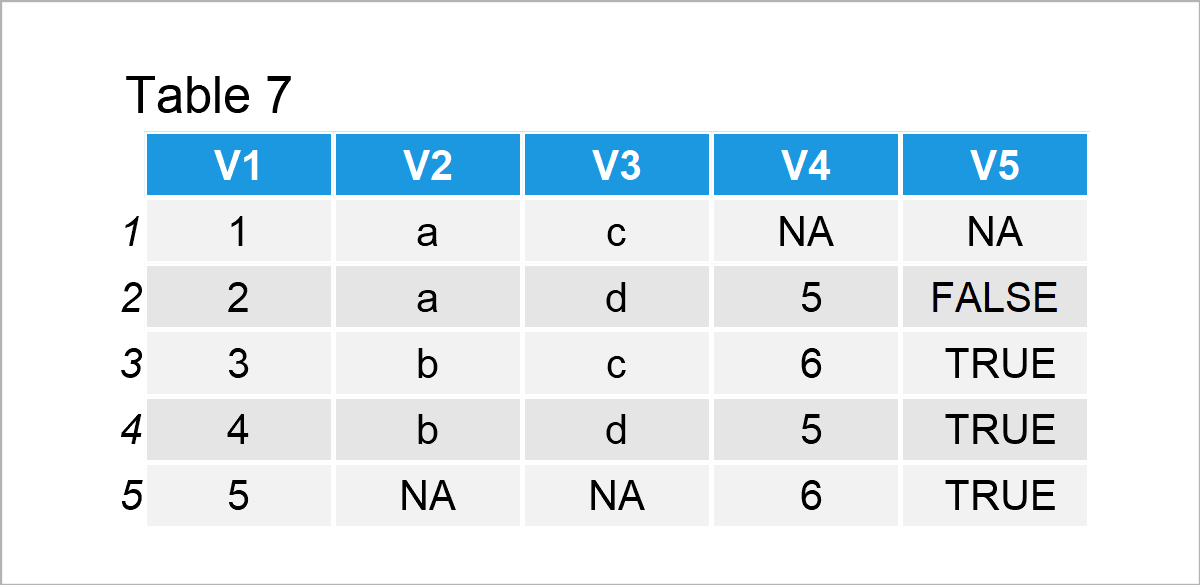
Table 7 shows the output of the previous R programming syntax. With argument all = TRUE we indicate that we want to merge all available information from the two datasets. All missing information is set to NA.
Example 5: Full Join of Three data.tables
The following code shows how to merge more than two data.tables at the same time. In the example, we conduct a full join, merging all information from three data.tables. Remember: It is important that we have a common variable V1, indicating how to match the information.
DT1_2_3_full <- Reduce(function (...) { merge(..., all = TRUE) },   # Full join
                       list(DT1, DT2, DT3))
DT1_2_3_full                                                        # Print data.table
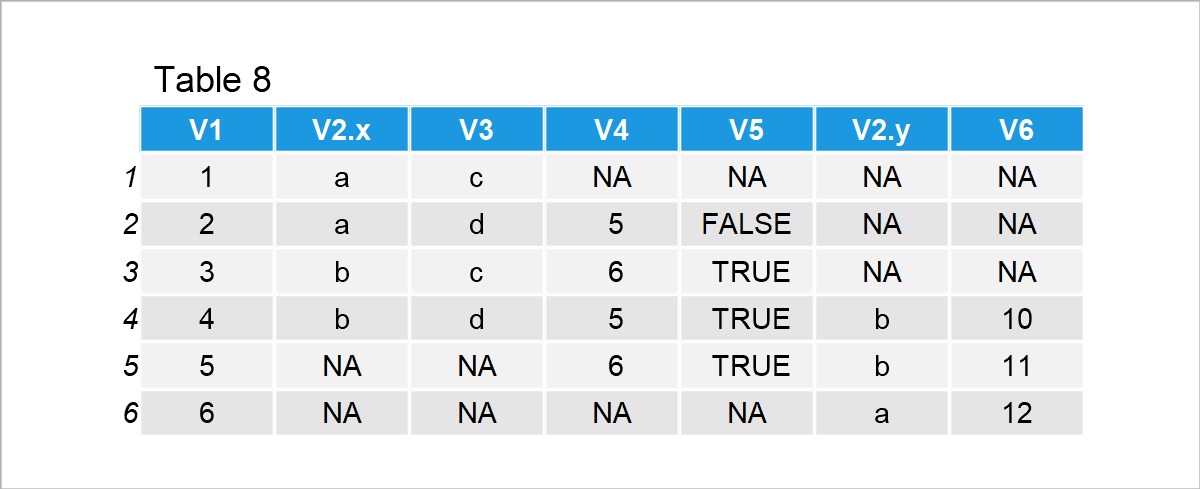
The resulting merged data.table is shown in Table 8.
Example 6: Inner Join of Three data.tables
As a last example, we make an inner join of three data.tables. For that, we simply set argument all = FALSE in the merge() function.
DT1_2_3_inner <- Reduce(function (...) { merge(..., all = FALSE) },   # Inner join
                        list(DT1, DT2, DT3))
DT1_2_3_inner                                                         # Print data.table

You can see that the three data.tables only have V1=4 in common.
Video, Further Resources & Summary
Do you want to learn more about the merging of data.tables in R? Then I recommend having a look at the following video on my YouTube channel. In the video, I demonstrate the R programming codes of this tutorial:
The YouTube video will be added soon.
Furthermore, you could have a look at the related tutorials on this homepage:
- Convert List to data.table in R (2 Examples)
- Use lapply Function for data.table in R (4 Examples)
- Print data.table Options in R (2 Examples)
- Write & Read CSV File as data.table in R (2 Examples)
- All R Programming Examples
You have learned in this article how to combine data.tables in R. If you have any additional comments and/or questions, don’t hesitate to let me know in the comments section.

This page was created in collaboration with Anna-Lena Wölwer. Have a look at Anna-Lena’s author page to get further information about her academic background and the other articles she has written for Statistics Globe.

I’m Joachim Schork. On this website, I provide statistics tutorials as well as code in Python and R programming.
Statistics Globe Newsletter
Get regular updates on the latest tutorials, offers & news at Statistics Globe. I hate spam & you may opt out anytime: Privacy Policy.


2 Comments. Leave new
Your data not matching with your query. Check your result tables. Giving me head ache x(
Hello,
We are so sorry for the inconvenience. The tables were mixed up, apparently. I have just updated them. Please let me know if something is still confusing. Thank you very much for your feedback and understanding.
Best,
Cansu