







Get Specific Element from pandas DataFrame in Python (2 Examples)
In this Python tutorial you’ll learn how to return a specific data cell from a pandas DataFrame.
Table of contents:
Let’s dive right in…
Exemplifying Data & Software Libraries
We first need to load the pandas library, in order to use the functions that are contained in the library:
import pandas as pd # Load pandas library
Next, we’ll also need to create a pandas DataFrame that we can use in the example syntax later on:
data = pd.DataFrame({'x1':range(80, 71, - 1),    # Create pandas DataFrame
                     'x2':['a', 'b', 'c', 'd', 'e', 'f', 'g', 'h', 'i'],
                     'x3':range(27, 18, - 1),
                     'x4':[1, 5, 2, 1, 1, 2, 4, 3, 1]})
print(data)                                      # Print pandas DataFrame
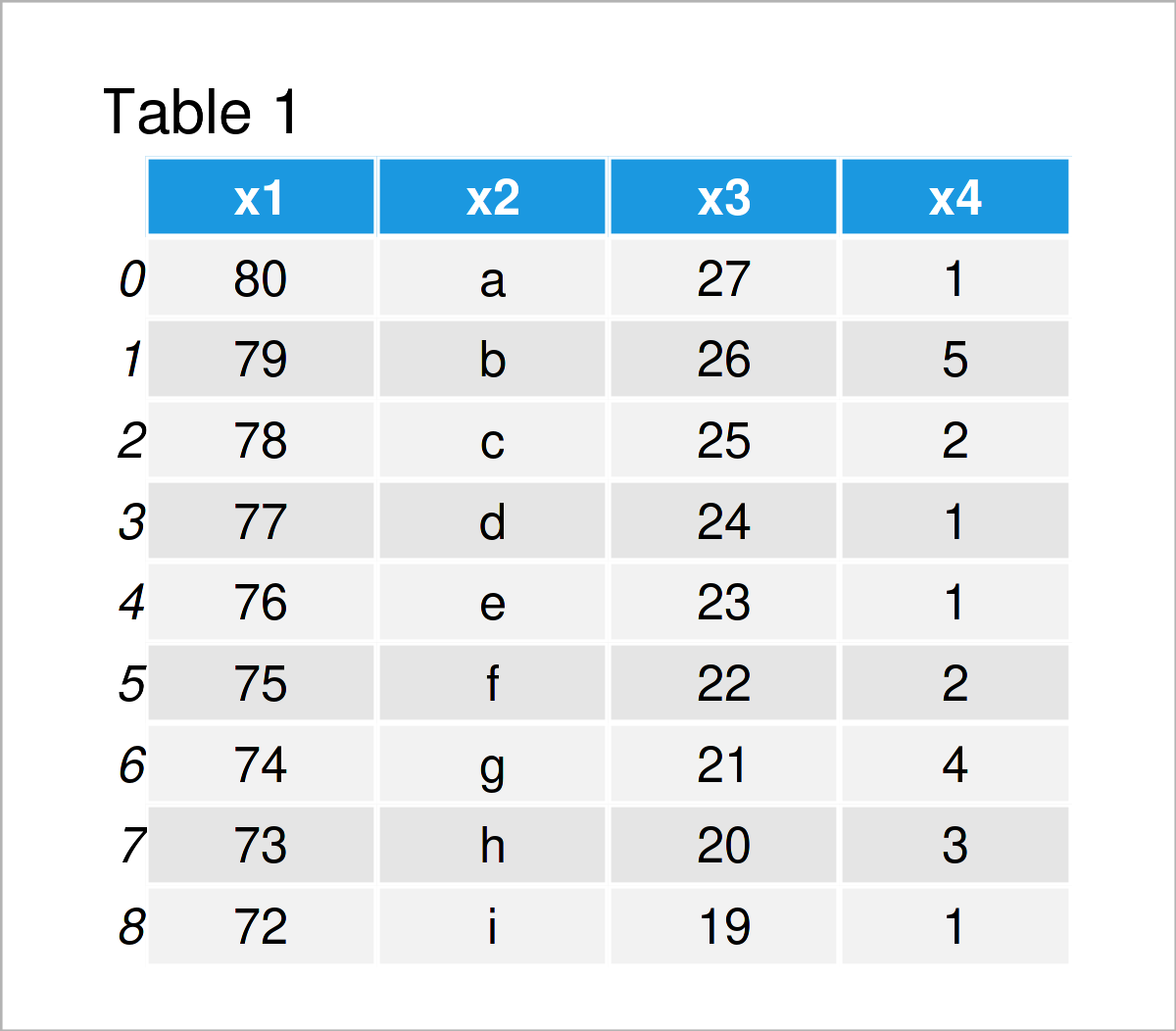
Table 1 shows the structure of our example data – It has nine rows and four columns.
Example 1: Extract Cell Value by Index in pandas DataFrame
This example demonstrates how to get a certain pandas DataFrame cell using the row and column index locations.
For this task, we can use the .iat attribute as shown below:
data_cell_1 = data.iat[5, 2]                     # Using .iat attribute
print(data_cell_1)                               # Print extracted value
# 22
The previous Python syntax has returned the value 22, i.e. the data cell at the row index 5 and the column index 2.
Example 2: Extract Cell Value by Column Name in pandas DataFrame
In this example, I’ll show how to print a specific element of a pandas DataFrame using the row index and the column name.
To achieve this, we can use the .at attribute:
data_cell_2 = data.at[1, "x2"]                   # Using .at attribute
print(data_cell_2)                               # Print extracted value
# b
The data cell at the row index 1 in the variable x2 contains the character “b”.
Video & Further Resources
Do you need more explanations on the examples of this tutorial? Then I recommend having a look at the following video on my YouTube channel. I’m explaining the examples of this tutorial in the video:
Besides that, you might have a look at the other articles on Statistics Globe. You can find a selection of related articles about similar topics such as lists and indices below.
- Get Index of Column in pandas DataFrame in Python
- Get Values of First Row in pandas DataFrame in Python
- Insert Row at Specific Position of pandas DataFrame in Python
- Get Column Names of pandas DataFrame as List in Python
- Get Max & Min Value of Column & Index in pandas DataFrame in Python
- Insert Column at Specific Position of pandas DataFrame in Python
- How to Use the pandas Library in Python
- Introduction to Python
This page has shown how to extract a certain data cell from a pandas DataFrame in the Python programming language. In case you have further questions, please let me know in the comments below.

I’m Joachim Schork. On this website, I provide statistics tutorials as well as code in Python and R programming.
Statistics Globe Newsletter
Get regular updates on the latest tutorials, offers & news at Statistics Globe. I hate spam & you may opt out anytime: Privacy Policy.