Calculate Mode by Group in Python (2 Examples)
In this tutorial, I’ll explain how to find the mode by group in the Python programming language.
Table of contents:
You’re here for the answer, so let’s get straight to the examples:
Example Data & Add-On Libraries
First, we need to load the pandas library:
import pandas as pd # Import pandas library in Python
Let’s also construct some example data:
data = pd.DataFrame({'x1':[6, 5, 2, 5, 8, 2, 7, 5, 8],              # Create pandas DataFrame
                     'x2':['x', 'y', 'y', 'x', 'y', 'x', 'z', 'x', 'x'],
                     'group1':['A', 'B', 'B', 'A', 'B', 'A', 'B', 'A', 'A'],
                     'group2':['a', 'a', 'a', 'a', 'a', 'b', 'b', 'b', 'b']})
print(data)                                                         # Print pandas DataFrame
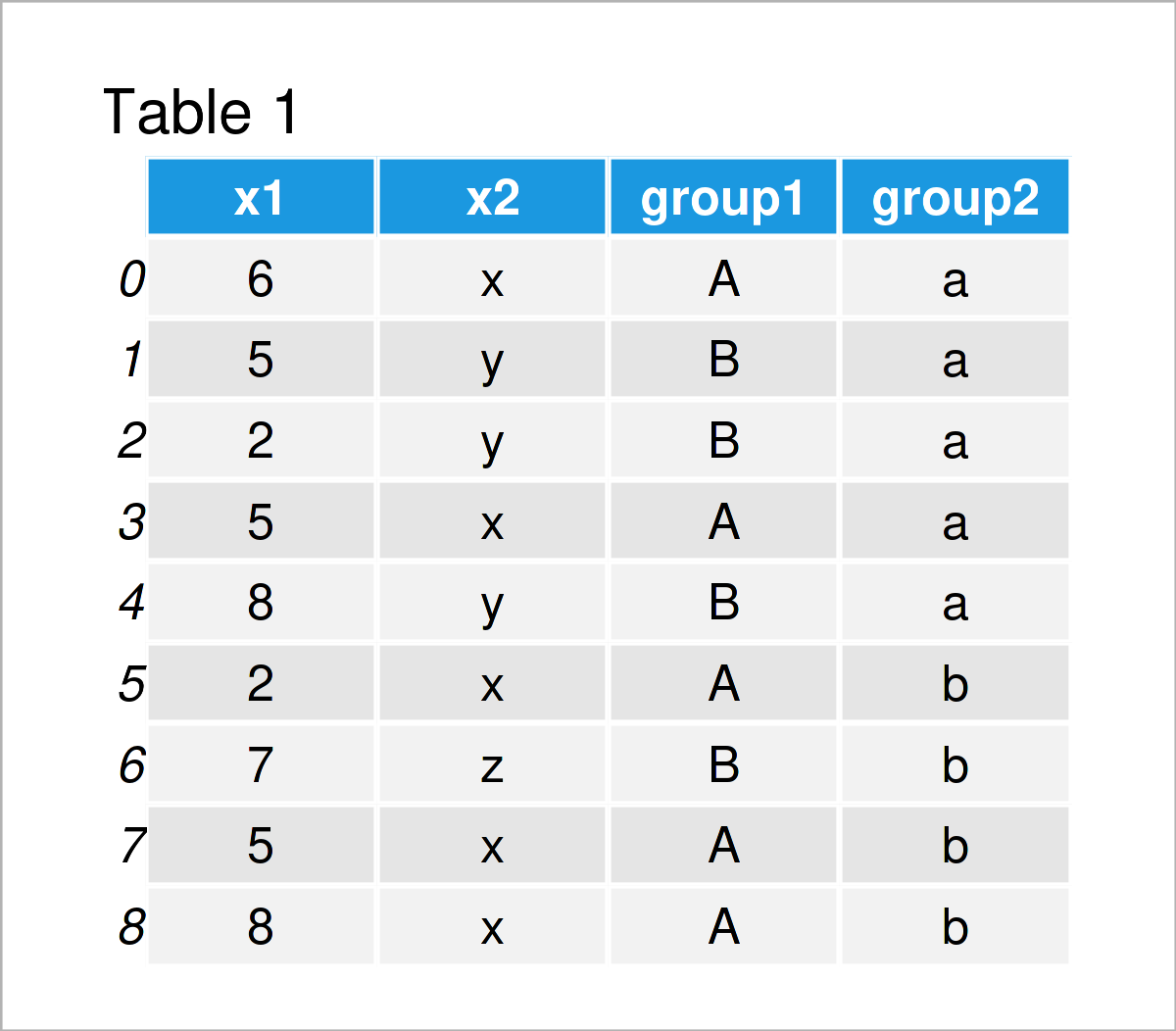
Table 1 shows the structure of our example pandas DataFrame: It consists of nine rows and four columns.
Example 1: Mode by Group in pandas DataFrame
In this example, I’ll demonstrate how to GroupBy a pandas DataFrame and select the most common element (i.e. the mode) in Python.
To accomplish this, we have to use the groupby, agg, and value_counts functions as shown in the following Python code:
print(data.groupby('group1').agg(lambda x:x.value_counts().index[0])) # Get mode by group
#         x1 x2 group2
# group1
# A        5  x      b
# B        8  y      a
The previous output shows the modes for each group and every column in our data set.
Example 2: Mode by Group & Subgroup in pandas DataFrame
The Python programming code below explains how to use multiple columns of a pandas DataFrame to create even smaller subgroups for the calculation of the mode.
For this task, we have to specify a list of all group indicators within the groupby function:
print(data.groupby(['group1', 'group2']).agg(lambda x:x.value_counts().index[0])) # Get mode by multiple groups
#                x1 x2
# group1 group2
# A      a        5  x
#        b        8  x
# B      a        8  y
#        b        7  z
The previous console output illustrates the mode values for each subgroup.
Video & Further Resources
In case you need further explanations on the contents of this tutorial, I can recommend watching the following video on my YouTube channel. I show the Python programming syntax of this article in the video:
The YouTube video will be added soon.
Furthermore, you might want to read the other articles on my homepage:
- Introduction to the pandas Library in Python
- Calculate Mode in Python
- mode() & multimode() Functions of statistics Module
- Mode of NumPy Array in Python
- Mean of Columns & Rows of pandas DataFrame
- Calculate Median in Python
- Summary Statistics of pandas DataFrame in Python
- Python Programming Tutorials
You have learned in this post how to compute the mode by group in the Python programming language. In case you have further questions and/or comments, let me know in the comments section below. Furthermore, please subscribe to my email newsletter in order to get updates on new tutorials.

I’m Joachim Schork. On this website, I provide statistics tutorials as well as code in Python and R programming.
Statistics Globe Newsletter
Get regular updates on the latest tutorials, offers & news at Statistics Globe. I hate spam & you may opt out anytime: Privacy Policy.