







Set Column Names when Reading CSV as pandas DataFrame in Python (Example)
In this article you’ll learn how to change the column names of a pandas DataFrame when importing a CSV file in the Python programming language.
The tutorial contains one example for the modification of the column names of a pandas DataFrame when importing a CSV file. More precisely, the tutorial contains the following:
Let’s dive right into the example:
Example Data & Software Libraries
In order to use the functions of the pandas library, we first have to import pandas to Python:
import pandas as pd # Import pandas library
Let’s also create some example data in Python:
data = pd.DataFrame({'x1':range(121, 127),    # Create pandas DataFrame
                     'x2':['a', 'b', 'c', 'd', 'e', 'f'],
                     'x3':range(41, 47),
                     'x4':[5, 5, 2, 9, 4, 7]})
print(data)                                   # Print pandas DataFrame
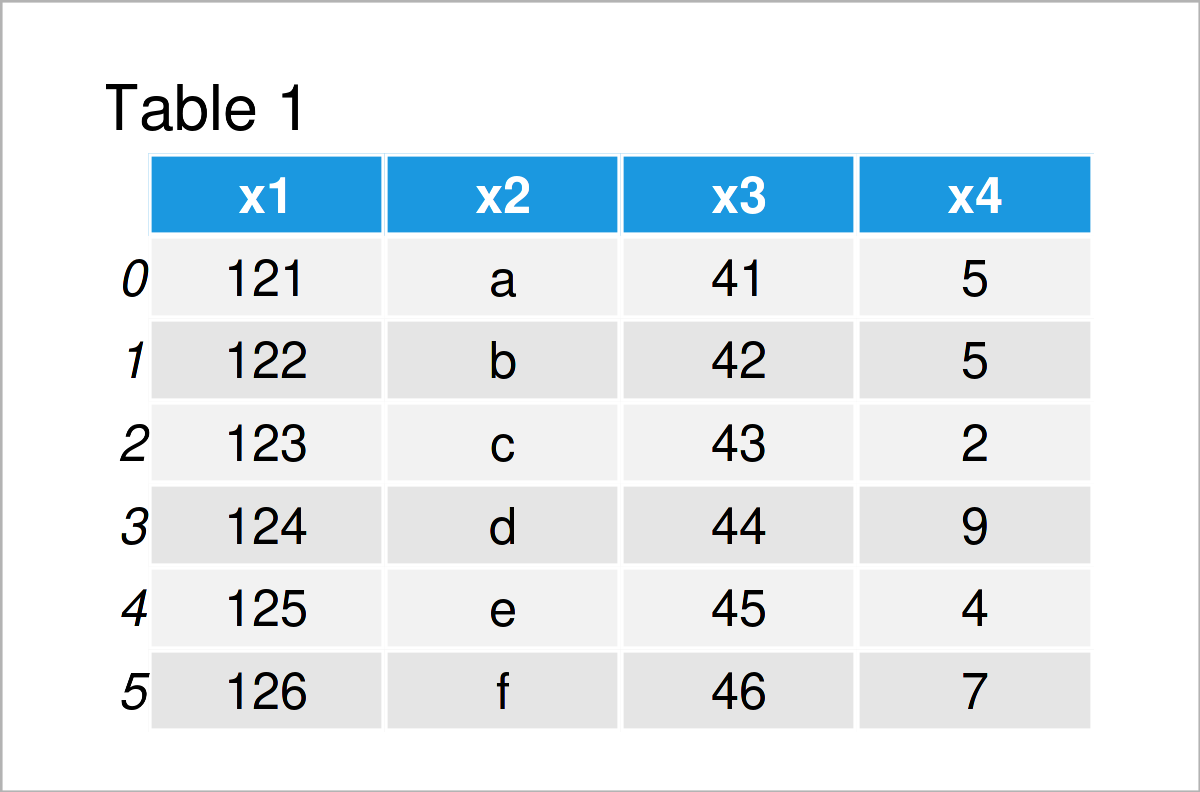
As you can see based on Table 1, our example data is a DataFrame containing six rows and four variables.
Let’s write these data to a new CSV file:
data.to_csv('data.csv', index = False) # Export pandas DataFrame to CSV
After we’ve executed the previous Python code, a new CSV file should appear in our current working directory. We’ll use this CSV file a a basement for the following example.
Example: Set New Column Names when Importing CSV File
The following code illustrates how to adjust the header of a pandas DataFrame that has been loaded from a CSV file.
For this task, we have to set the skiprows argument to 1, and we have to assign a list of new column names to the names argument.
Consider the Python syntax below:
data_import = pd.read_csv('data.csv',         # Read pandas DataFrame from CSV
                          skiprows = 1,
                          names = ['col1', 'col2', 'col3', 'col4'])
print(data_import)                            # Print imported pandas DataFrame
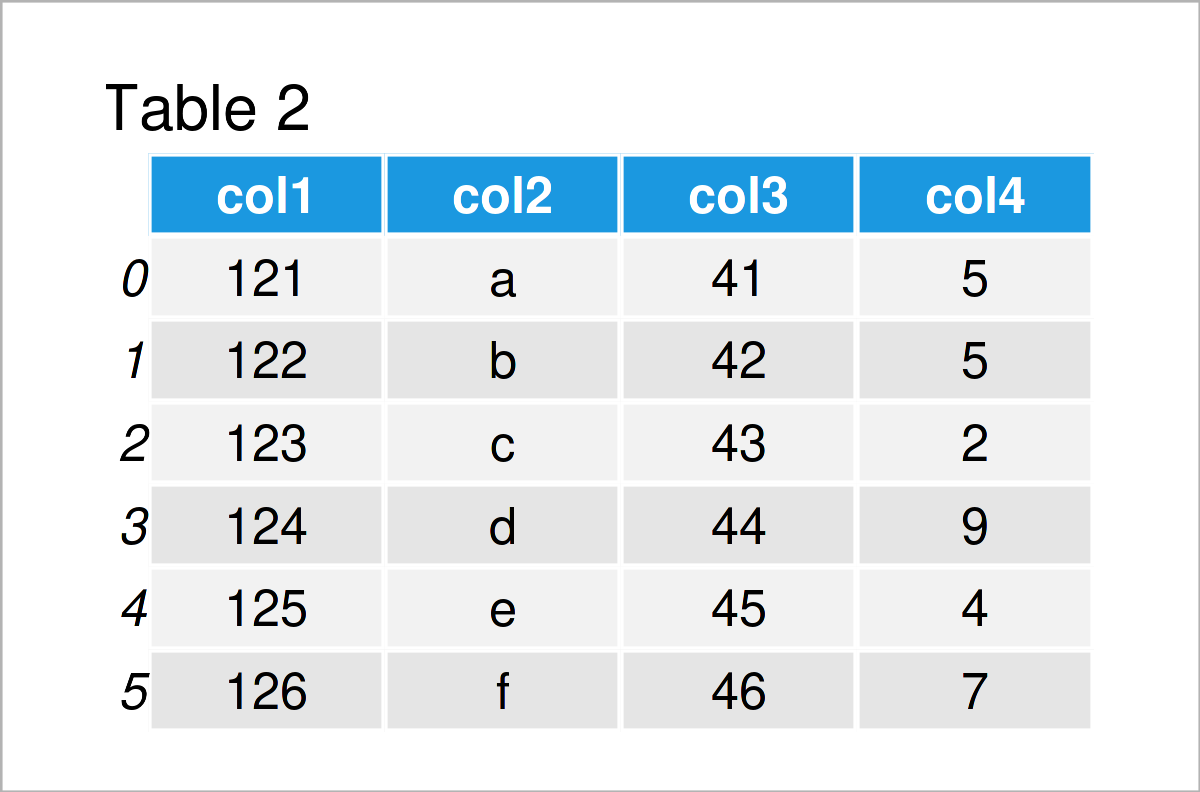
As shown in Table 2, we have managed to create a new pandas DataFrame using the previous Python syntax. This DataFrame has new variables names, i.e. col1-col4 instead of x1-x4.
Video, Further Resources & Summary
I have recently released a video on my YouTube channel, which illustrates the Python syntax of this tutorial. You can find the video below:
The YouTube video will be added soon.
In addition, you might have a look at the other tutorials on my homepage. I have published numerous tutorials on similar topics such as lists and indices:
- pandas Library Tutorial in Python
- Load CSV File as pandas DataFrame in Python
- Read CSV File without Unnamed Index Column
- Read Only Certain Columns of CSV File as pandas DataFrame
- Skip First Row when Reading pandas DataFrame from CSV File
- Drop pandas DataFrame Column by Index in Python
- Get Index of Column in pandas DataFrame in Python
- Get pandas DataFrame Column as List in Python
- Get Column Names of pandas DataFrame as List in Python
- All Python Programming Examples
In summary: This tutorial has illustrated how to set the column names of a pandas DataFrame when importing a CSV file in the Python programming language. Let me know in the comments section below, if you have additional questions.

I’m Joachim Schork. On this website, I provide statistics tutorials as well as code in Python and R programming.
Statistics Globe Newsletter
Get regular updates on the latest tutorials, offers & news at Statistics Globe. I hate spam & you may opt out anytime: Privacy Policy.