







Weighted Frequency Table in R (Example)
On this page, I’ll explain how to construct a table with weights in the R programming language.
The content of the post looks as follows:
Here’s the step-by-step process:
Creating Example Data
The following data will be used as basement for this R tutorial:
data <- data.frame(values = c(letters[1:3], letters[2:5], "b"),  # Create example data
                   weights = c(1, 2, 1, 5, 3, 1, 2, 3))
data                                                             # Print example data
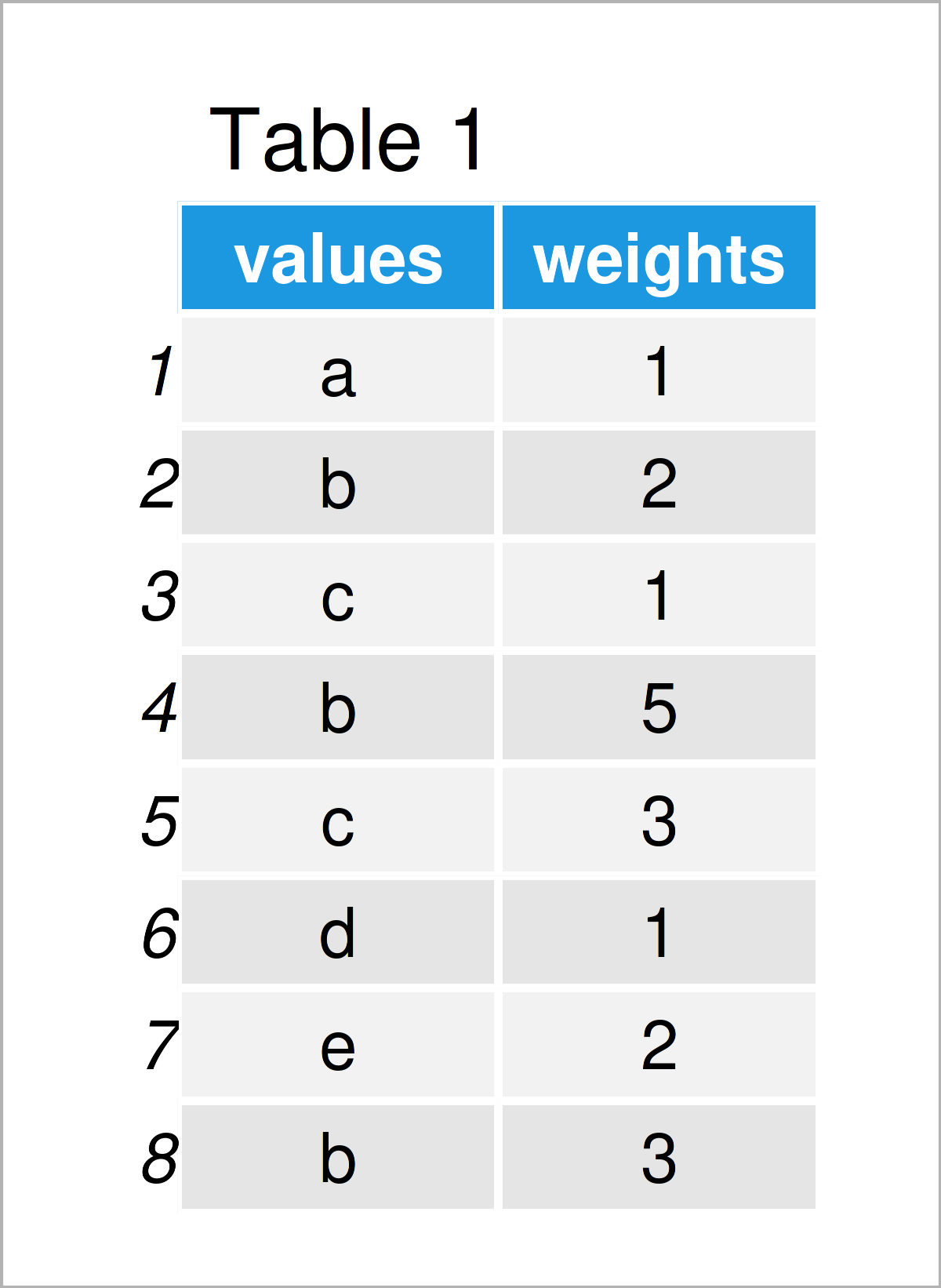
Table 1 shows that our example data has eight rows and two columns. The first variable contains the values that we want to show in a frequency table, and the second column contains the corresponding weights.
Example: Create Weighted Frequency Table Using wtd.table() Function of questionr Package
The following R programming syntax explains how to create a table with weighting using the R programming language.
For this task, we can use the questionr package. If we want to use the functions of the questionr package, we first have to install and load questionr:
install.packages("questionr")                                    # Install questionr package
library("questionr")                                             # Load questionr
Next, we can apply the wtd.table function of the questionr package to make a weighted frequency table:
my_wtd_table <- wtd.table(x = data$values,                       # Create weighted table
                          weights = data$weights)
my_wtd_table                                                     # Print weighted table
# a  b  c  d  e
# 1 10  4  1  2
The previous RStudio console output shows our input data in a weighted frequency distribution table.
Video & Further Resources
Have a look at the following video on my YouTube channel. In the video tutorial, I show the contents of this tutorial:
The YouTube video will be added soon.
Furthermore, you might want to have a look at the related articles on this website.
- Proportions with dplyr Package in R
- Cumulative Frequency & Probability Table in R
- All R Programming Examples
In this article, I have demonstrated how to create a weighted frequency table in R programming. Tell me about it in the comments, in case you have additional questions. In addition, please subscribe to my email newsletter to get updates on new tutorials.

I’m Joachim Schork. On this website, I provide statistics tutorials as well as code in Python and R programming.
Statistics Globe Newsletter
Get regular updates on the latest tutorials, offers & news at Statistics Globe. I hate spam & you may opt out anytime: Privacy Policy.


4 Comments. Leave new
Dear Joachim,
Thank you very much for your clear examples, they help me a lot. I have a question about this post (Create Weighted Frequency Table Using wtd.table() Function of questionr Package). I succeeded 😉 However, I would like to make a frequency table of several variables, all using the same weight factor. Is this possible or should I continue with one variable at the time?
Thank you so much for your reply
Hello Eva,
Please try this code:
#install.packages(“questionr”)
library(questionr)
# Sample data
df <- data.frame( var1 = sample(c("A", "B", "C"), 5, replace = TRUE), var2 = sample(c("X", "Y", "Z"), 5, replace = TRUE), var3 = sample(c("M", "N"), 5, replace = TRUE), weight_var = sample(1:10, 5, replace = TRUE) ) df vars_to_tabulate <- c("var1", "var2", "var3") list_of_tables <- lapply(vars_to_tabulate, function(var_name) { wtd.table(df[[var_name]], weights = df$weight_var) }) names(list_of_tables) <- vars_to_tabulate list_of_tables Best, Cansu
Dear Cansu,
Thank you so much, this code is so elegant compared to mine;-)
Hopefully you can help me out with the last bit as well.
It concerns the labels and such. When I did the calculations one at the time, I first changed the output to a data.frame, then I transposed and changed the column names. It looks like this:
# Based on your example, here a new one. All the vars are survey questions, with 3 response options
df2 <- data.frame( var1 = sample(c("A", "B", "C"), 5, replace = TRUE), var2 = sample(c("C", "B", "A"), 5, replace = TRUE), var3 = sample(c("C", "B", "A"), 5, replace = TRUE), weight_var = sample(1:10, 5, replace = TRUE) )
var1 <- wtd.table(x = df2$var1, weights = df2$weight_var)
var1 <-data.frame(var1)
var1 <- data.frame(cbind(names(var1), t(var1)))
colnames(var1) <- c('question','yes', 'no', 'maybe')
rownames(var1) <- NULL
var1 = var1 [-1,]
# can’t get this line below to work anymore, but it changed the value “Freq” in the first column, to “var1”
var1$question<- gsub(fixed("Freq"), "var1", var1$vraag)
Would there be an easy way to add this in your code as well?
Thanks for your reply!
Hello Eva,
Sorry for the late response. I was on a seminar trip. Could you handle the issue? Let me know if you still need help.
Best,
Cansu