







Merge Time Series in R (Example)
In this R tutorial, I’ll explain how to merge two time series objects in the R programming language.
The tutorial will contain the following contents:
Let’s dive into it!
Example Data
Let’s create two time series objects (ts) in R that we can use in the example later on:
time1 <- ts(rep(1, 12),           # Create first time series
            start = c(2019, 1),
            frequency = 12)
time2 <- ts(rep(2, 12),           # Create second time series
            start = c(2020, 1),
            frequency = 12)
Merge Time Series in R
Typically, we would merge two objects above each other with the rbind R function. Let’s see how this looks with ts objects:
rbind(time1, time2) # Rbind times series (not working)

Figure 1: Merging Time Series with rbind() is not Working Properly.
Not good! As Figure 1 shows, the times series attributes are lost, when we use the rbind function.
The correct way to combine multiple ts objects is the following:
ts(c(time1, time2),               # Combined time series object
   start = start(time1),
   frequency = frequency(time1))
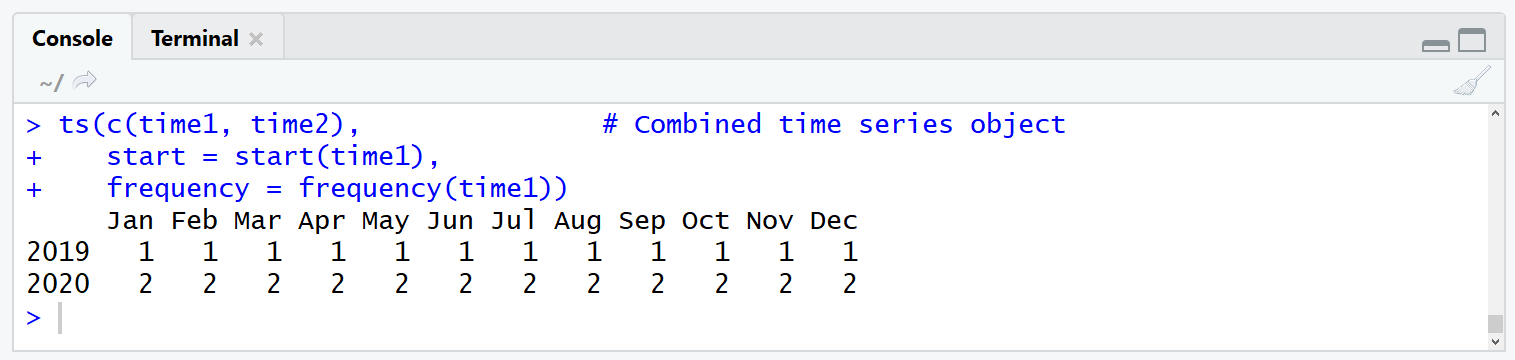
Figure 2: ts Function with Frequency Specification Works Well.
Figure 2 shows how a good merging of two time series objects should look like.
Video & Further Resources on the Topic
Do you need further info on the R code of this article? Then you might have a look at the following video on my YouTube channel. In the video, I’m explaining the contents of this post.
Have a look at the following video of Jordan Kern’s YouTube channel. In the video, he illustrates how to analyze time series data.
Furthermore, you may have a look at some of the other articles on my homepage.
- rbind in R Programming
- merge in R Programming
- R Functions List (+ Examples)
- The R Programming Language
In this article, you learned how to retain the structure of time series data when it is combined in the R programming language. Don’t hesitate to let me know in the comments section, in case you have further questions.

I’m Joachim Schork. On this website, I provide statistics tutorials as well as code in Python and R programming.
Statistics Globe Newsletter
Get regular updates on the latest tutorials, offers & news at Statistics Globe. I hate spam & you may opt out anytime: Privacy Policy.


2 Comments. Leave new
Hi, I want to know about start=. How to use the same start= in combine ? Because it changes to every year.
Hey Syada,
Thanks for the comment! Could you explain in some more detail what you are trying to achieve?
Regards,
Joachim