Skip Rows but Keep Header when Reading CSV File in Python (Example)
In this tutorial you’ll learn how to remove certain rows when importing a CSV file in the Python programming language.
The tutorial contains this information:
Here’s how to do it!
Example Data & Software Libraries
First, we have to import the pandas library:
import pandas as pd # Load pandas library
The following data will be used as a basis for this Python tutorial:
data = pd.DataFrame({'x1':range(10, 16),    # Create pandas DataFrame
                     'x2':[4, 3, 8, 3, 9, 8],
                     'x3':[5, 9, 5, 3, 4, 7],
                     'x4':['a', 'b', 'c', 'd', 'e', 'f']})
print(data)                                 # Print pandas DataFrame
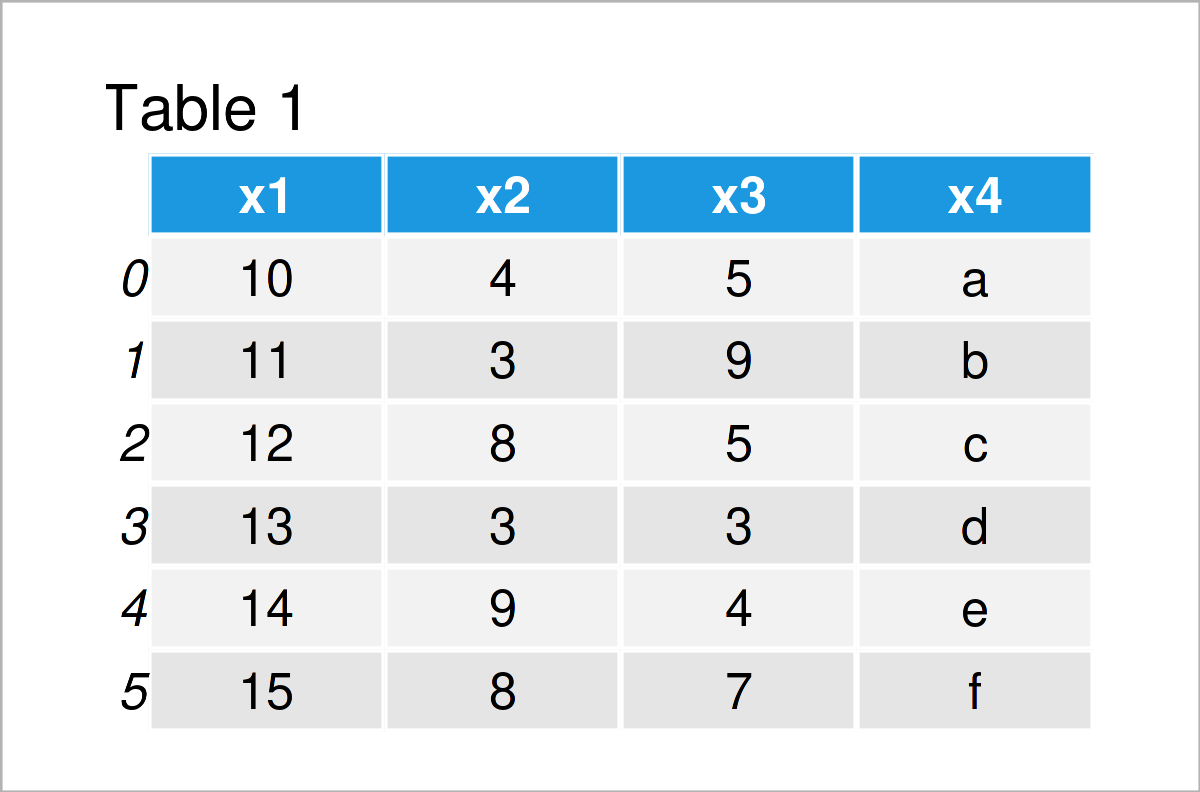
As you can see based on Table 1, the example data is a DataFrame consisting of six rows and four variables.
Next, we can write this pandas DataFrame to a CSV file using the to_csv function:
data.to_csv('data.csv', index = False) # Export pandas DataFrame
The CSV file that got created after executing the previous Python code will be used as a basis for the following example.
Example: Skip Certain Rows when Reading CSV File as pandas DataFrame
The following Python syntax illustrates how to read a pandas DataFrame from a CSV, but ignore certain rows.
For this task, we can use the read_csv file function as shown below. Within the read_csv function, we have to assign a list of rows indices that we want to delete to the skiprows argument:
data_import = pd.read_csv('data.csv',       # Read pandas DataFrame from CSV
                          skiprows = [1, 3, 5])
print(data_import)                          # Print imported pandas DataFrame
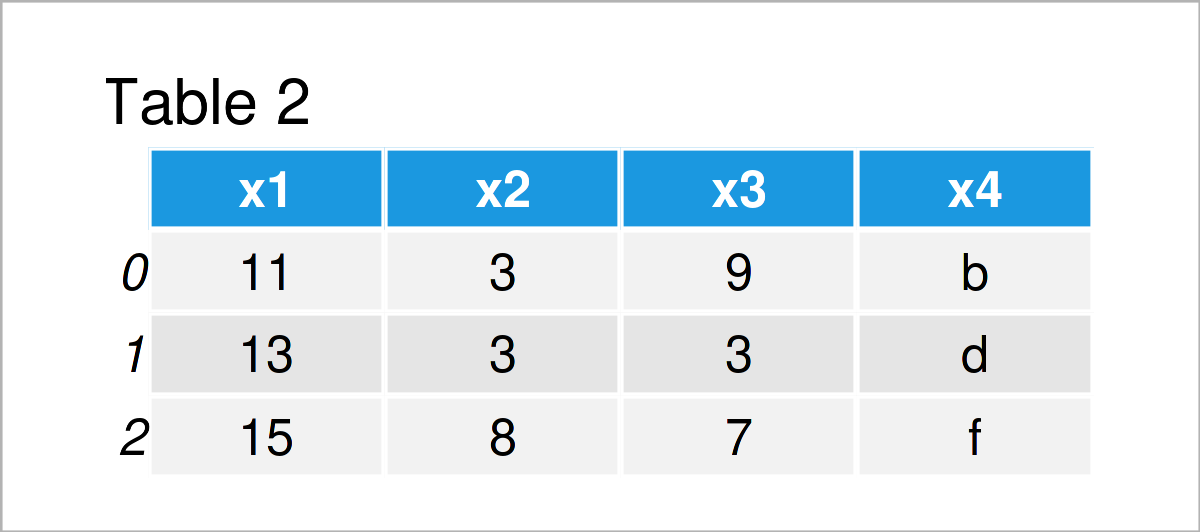
Table 2 shows the output of the previous Python syntax: We have constructed a new pandas DataFrame containing only some of the rows in our CSV file. However, the column names of the input file have been retained.
Video & Further Resources
In case you need further info on the Python programming code of this tutorial, I recommend having a look at the following video on the Statistics Globe YouTube channel. I explain the Python code of this tutorial in the video:
The YouTube video will be added soon.
Furthermore, you may read some of the other articles on my website:
- pandas Library Tutorial in Python
- Load CSV File as pandas DataFrame
- Read Only Certain Columns of CSV File
- Read Only First Column of pandas DataFrame in CSV File
- All Python Programming Tutorials
You have learned in this article how to skip certain rows when creating a pandas DataFrame from a CSV file, but keeping the header in the Python programming language. In case you have additional comments or questions, let me know in the comments section.

I’m Joachim Schork. On this website, I provide statistics tutorials as well as code in Python and R programming.
Statistics Globe Newsletter
Get regular updates on the latest tutorials, offers & news at Statistics Globe. I hate spam & you may opt out anytime: Privacy Policy.