







Max & Min in Python (5 Examples)
This tutorial shows how to find the maximum and minimum in a list and the columns of a pandas DataFrame in Python.
Table of contents:
Let’s start right away.
Example 1: Maximum & Minimum of List Object
The following syntax illustrates how to calculate the maximum and minimum of a list object.
For this example, we first have to create an example list:
my_list = [1, 4, 2, 9, 7, 2, 1, 8, 3, 3, 2, 1]             # Create example list
print(my_list)                                             # Print example list
# [1, 4, 2, 9, 7, 2, 1, 8, 3, 3, 2, 1]
In the next step, we can apply the max function to return the maximum of our list:
print(max(my_list))                                        # Get max of list
# 9
As you can see, the max value in our list is 9.
Similar to that, we can apply the min function to return the minimum value in our list:
print(min(my_list))                                        # Get min of list
# 1
The minimum value in our list is 1.
Example 2: Maximum & Minimum of One Particular Column in pandas DataFrame
In Example 2, I’ll demonstrate how to get the max and min numbers in a pandas DataFrame column.
As a first step, we have to load the pandas library to Python:
import pandas as pd # Import pandas library to Python
Furthermore, we have to create an example pandas DataFrame:
data = pd.DataFrame({'x1':[5, 2, 4, 2, 2, 3, 9, 1, 7, 5],  # Create pandas DataFrame
                     'x2':range(10, 20),
                     'group':['A', 'A', 'B', 'B', 'C', 'A', 'C', 'C', 'A', 'B']})
print(data)                                                # Print pandas DataFrame
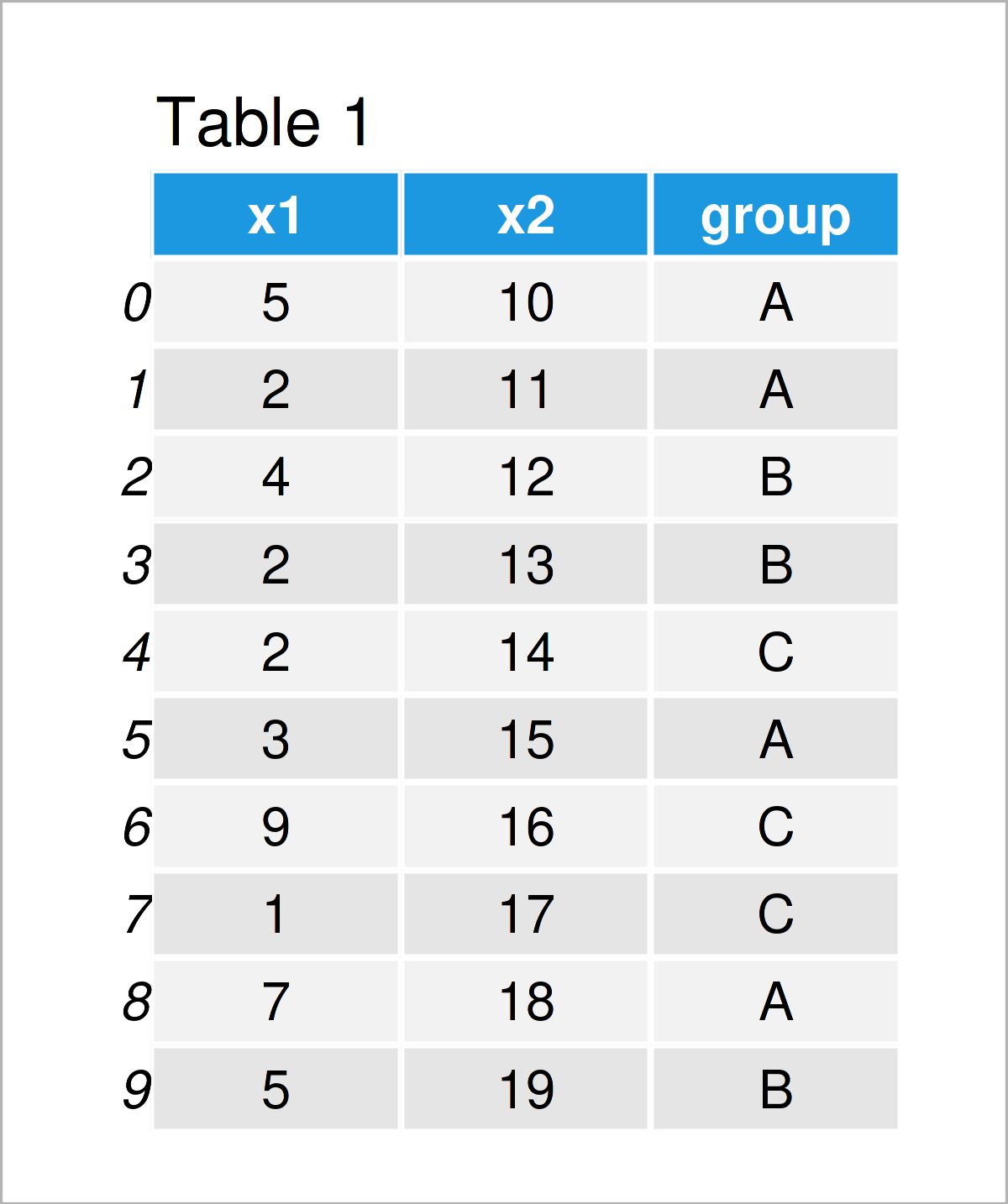
As shown in Table 1, the previous Python programming code has created a new pandas DataFrame containing three columns.
Let’s return the maximum value of the variable x1…
print(data['x1'].max())                                    # Get max of one column
# 9
…and the minimum value as well:
print(data['x1'].min())                                    # Get min of one column
# 1
Example 3: Maximum & Minimum of All Columns in pandas DataFrame
In the previous example, I have explained how to compute the maximum and minimum value in one single column of a pandas DataFrame.
In this example, I’ll explain how to find the maxima and minima of all columns.
For this task, we can apply the max…
print(data.max())                                          # Get max of all columns
# x1        9
# x2       19
# group     C
# dtype: object
…and min functions to our entire data set:
print(data.min())                                          # Get min of all columns
# x1        1
# x2       10
# group     A
# dtype: object
The previous console outputs show the maxima and minima of our three DataFrame columns. Note that even the alphabetical maxima and minima was returned for the group column.
Example 4: Maximum & Minimum of Rows in pandas DataFrame
The following code demonstrates how to find the max and min values for each row of a pandas DataFrame.
To achieve this, we have to specify the axis argument to be equal to 1 within the max…
print(data.max(axis = 1, numeric_only = True))             # Get max of rows
# 0    10
# 1    11
# 2    12
# 3    13
# 4    14
# 5    15
# 6    16
# 7    17
# 8    18
# 9    19
# dtype: int64
…and min commands:
print(data.min(axis = 1, numeric_only = True))             # Get min of rows
# 0    5
# 1    2
# 2    4
# 3    2
# 4    2
# 5    3
# 6    9
# 7    1
# 8    7
# 9    5
# dtype: int64
Example 5: Maximum & Minimum by Group in pandas DataFrame
It is also possible to get the maxima and minima in the columns of a pandas DataFrame by group.
Example 5 shows how to use the group column in our exemplifying data set to return multiple max and min values.
The following code prints the maxima for each group…
print(data.groupby('group').max())                         # Get max by group
#        x1  x2
# group
# A       7  18
# B       5  19
# C       9  17
…and the following Python syntax shows the minima by group:
print(data.groupby('group').min())                         # Get min by group
#        x1  x2
# group
# A       2  10
# B       2  12
# C       1  14
Video & Further Resources
Some time ago, I have published a video on my YouTube channel, which explains the Python codes of this tutorial. You can find the video below:
Furthermore, you may want to read some related articles on this homepage:
- Max & Min by Group in Python
- Get Max & Min Value of Column & Index in pandas DataFrame
- Max & Min of NumPy Array in Python
- Summary Statistics of pandas DataFrame
- Basic Course for the pandas Library in Python
- Python Programming Examples
In this article, I have shown how to calculate the maximum and minimum in the Python programming language. In case you have further questions, please let me know in the comments section.

I’m Joachim Schork. On this website, I provide statistics tutorials as well as code in Python and R programming.
Statistics Globe Newsletter
Get regular updates on the latest tutorials, offers & news at Statistics Globe. I hate spam & you may opt out anytime: Privacy Policy.