Transpose Data Frame & Set First Column as Header in R (Example)
In this tutorial, I’ll illustrate how to transpose a data matrix and use the first variable as column names in R.
The article contains one example for the transposing of a data matrix and with the first variable as header. To be more specific, the article will contain these topics:
Let’s dive right in…
Creating Example Data
The following data is used as basement for this R programming language tutorial:
data <- data.frame(head = paste0("x", 1:4),                  # Create example data
                   row1 = 1:4,
                   row2 = 11:14,
                   row3 = 101:104)
data                                                         # Print example data
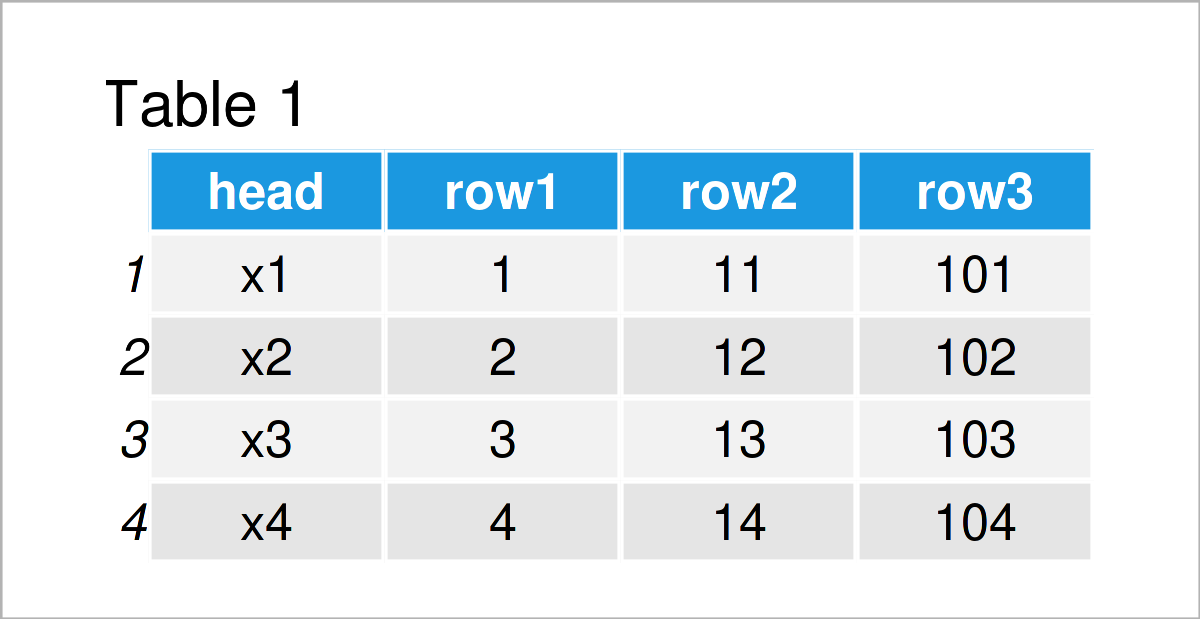
Table 1 shows that our example data consists of four rows and four columns called “head”, “row1”, “row2”, and “row3”.
Example: Transposing Data Frame & Maintaining First Column as Heading
This section demonstrates how to transpose a data matrix and use the first column of the input data frame as header.
For this task, we can use the t, data.frame, and setNames functions as shown below:
data_t <- setNames(data.frame(t(data[ , - 1])), data[ , 1])  # Transpose data
data_t                                                       # Print transposed data
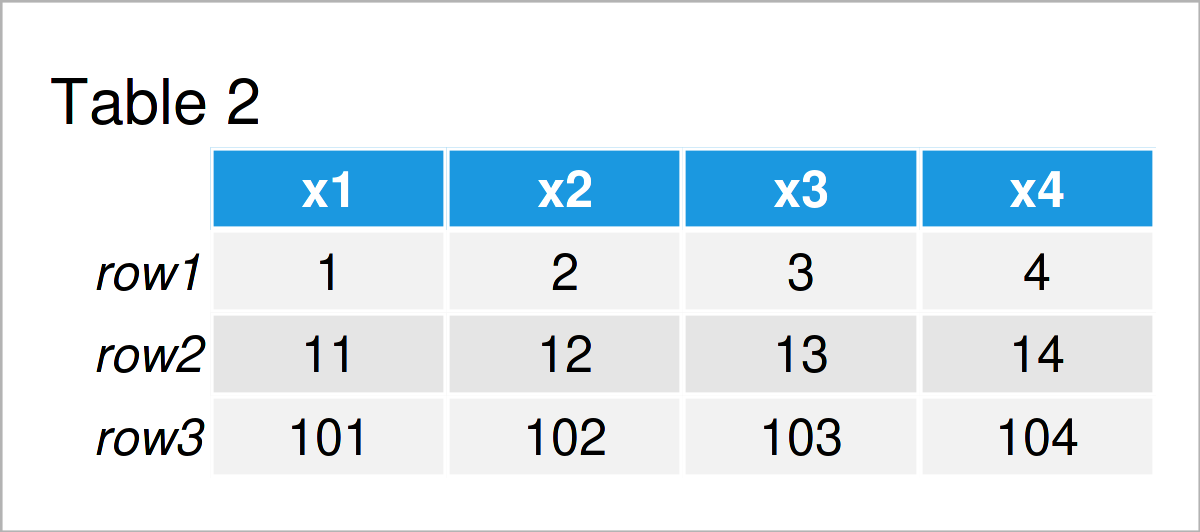
As shown in Table 2, the previous R code has created a transposed version of our data with the first variable as column names.
Video, Further Resources & Summary
I have recently released a video on my YouTube channel, which explains the examples of this article. You can find the video below.
Besides the video, you may read the related R programming tutorials on my homepage. I have released several articles that are related to the transposing of a data matrix and with the first variable as header already.
- Move Column to First Position of Data Frame
- Extract Single Column as Data Frame
- Set Row & Column Names of Data with Unknown Dimension
- R Programming Examples
In summary: In this R tutorial you have learned how to rotate a data frame and keep the first variable as column names. In case you have additional questions, please let me know in the comments.

I’m Joachim Schork. On this website, I provide statistics tutorials as well as code in Python and R programming.
Statistics Globe Newsletter
Get regular updates on the latest tutorials, offers & news at Statistics Globe. I hate spam & you may opt out anytime: Privacy Policy.